




LCC Unity SDK is an industrial-grade development kit for 3D Gaussian Splatting (3DGS) officially provided by XGRIDS (Shenzhen Qiyu Innovation Technology). It supports high-performance rendering of object-level to city-level 3DGS data scenes, supports data formats such as LCC2, PLY, SPLAT, SPZ, SOG and KSPLAT, can be deployed to Windows, Ubuntu, macOS, iOS, Android, VR and other platforms, and covers single-scene and multi-scene real-time mixed rendering, with industrial- and game-grade features such as collision, highlighting, clipping, re-lighting, shadows, projected decals and video stream fusion.
The SDK currently provides more than 90 APIs, and its features keep improving with each version.
Supported Platforms
| Platform | Support Level | Status | Notes |
|---|---|---|---|
| Windows 10 / 11 | Full support for all features | ✅ Supported | |
| macOS 12 and later | Full support for all features | ✅ Supported | Intel + M-series chips |
| Ubuntu 20.04 and later | Full support for all features | ✅ Supported | |
| Android 10 and later | Rendering, point cloud switching, raycasting, etc. | ✅ Supported | |
| iOS 15 and later | Rendering, point cloud switching, raycasting, etc. | ✅ Supported | |
| Pico 4 Ultra | Rendering, point cloud switching, raycasting, etc. | ✅ Supported | Supports both PCVR streaming and on-device rendering |
| Quest 3 | Rendering, point cloud switching, raycasting, etc. | ✅ Supported | Supports both PCVR streaming and on-device rendering |
Supported Unity Versions
| Unity Version | Supported Render Pipelines | Status |
|---|---|---|
| Unity 2022.3 LTS | Built-in, URP | ✅ Supported |
| Unity 6000.0 / 6000.1 / 6000.2 / 6000.3 / 6000.4 | URP | ✅ Supported |
| Unity 6000.5 LTS | URP | ✅ Supported |
UPM Package Structure
After importing the SDK into the Unity Editor, an LCC SDK folder appears in the Packages directory, containing three directories, as shown below:
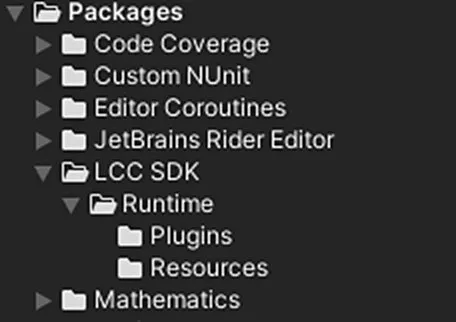
LCC Unity SDK package directory structure
| Subfolder | Description |
|---|---|
| Runtime | Related files and scripts. |
| Plugins | Library files required by the LCC SDK itself. |
| Resources | Compiled shaders and other resource files for each platform. |
Obtaining the SDK
LCC Data Coordinate System
The coordinate system of LCC data is shown below:

Coordinate system of LCC data
LCC data uses a Z-up right-handed coordinate system, while Unity uses a Y-up left-handed coordinate system. When rendering data in Unity, a coordinate transformation is required — typically set the Transform of the Renderer with Rotation.x = -90 and Scale.x = -1.
For details about the LCC data format, see:
This chapter is from the official XGRIDS user manual. Official source (opens in a new tab) · Updated:



