

Applicable devices: Lixel K2, Lixel L2 Pro, Lixel P1
What Is Map Fusion
Map fusion supports fusing multiple segments of ground scan data from the same model of Lixel device to achieve larger-scale 3D reconstruction. When a single capture cannot cover the entire scene (exceeding the device duration limit or the scene being too large), you can split the scene into multiple sub-scenes, capture them separately, and then stitch them into one complete model via "Map Fusion" in LCC Studio.
Prerequisites
- All data for a single stitch must come from the same model of device
- Each map segment must be linked to other segments via RTK or relative control points
- When any segment has valid RTK, the stitched result will obtain global coordinates
Overlap Region Requirements
| Principle | Description |
|---|---|
| Overlap distance | Adjacent map segments need approximately 15 m of overlap |
| Minimum overlap | The overlap region must not be less than 10 m |
| Avoid complete overlap | Do not let one map segment almost completely overlap another |
| Texture requirement | Choose texture-rich locations for the overlap region |
| Locations to avoid | Avoid placing overlaps in dim light, stairs, narrow corridors, mirror reflections, etc. |
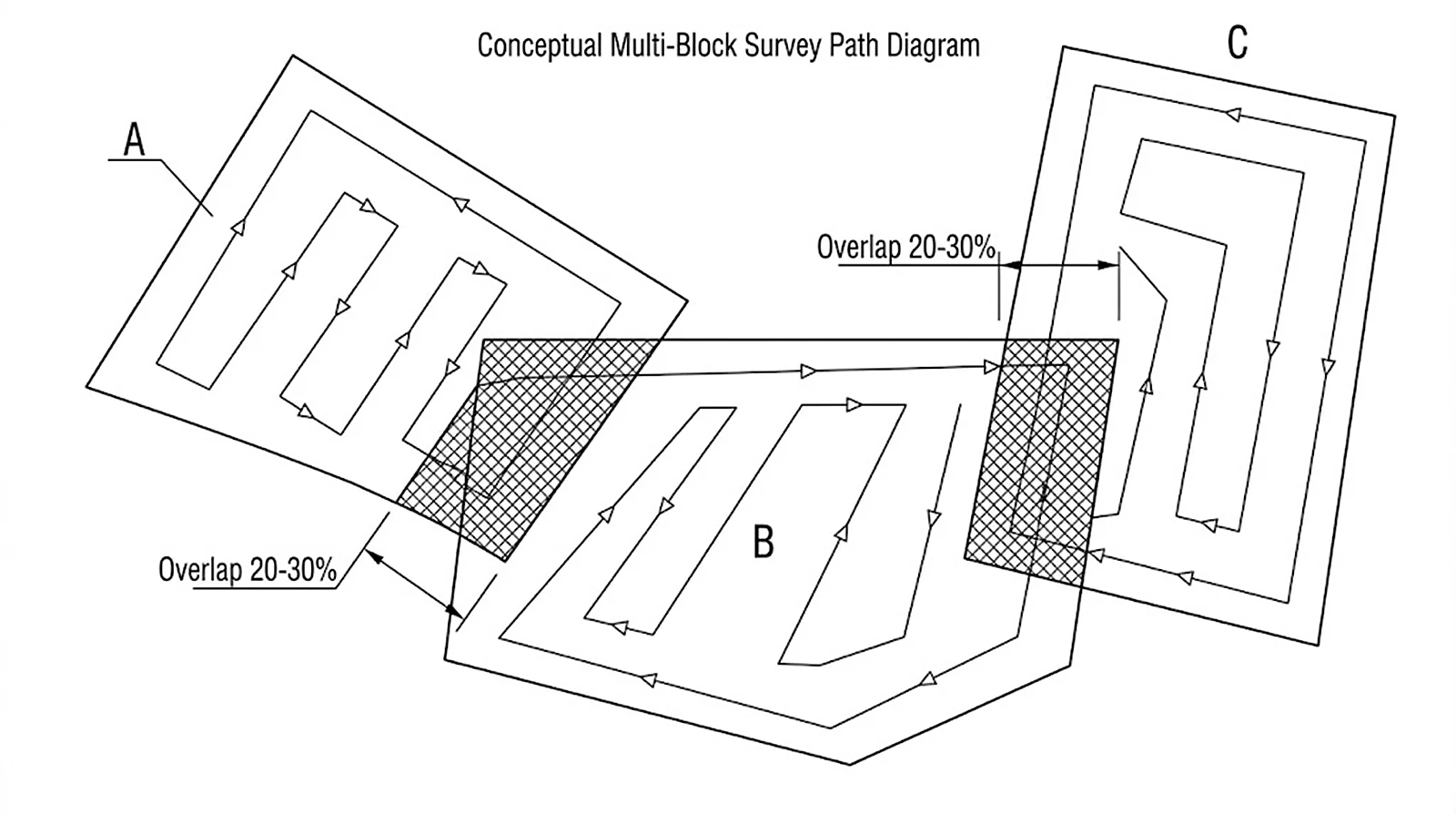
Map fusion splitting strategy (overlap region approx. 15 m)
Stitching Methods
Each map segment must be linked to other segments via either of the following methods:
| Method | Description |
|---|---|
| RTK | The device captures with RTK enabled, automatically obtaining global coordinates |
| Relative control points | Adjacent map segments set up control points with the same name for alignment |
Stitching Examples
Using 3-segment stitching as an example, the following combinations all succeed:
| Example | Segment 1 | Segment 2 | Segment 3 | Description |
|---|---|---|---|---|
| ① | RTK | RTK | RTK | All have RTK, the simplest |
| ② | Control point (A) | Control point (A,B) | Control point (B) | Pure control-point chained linking |
| ③ | RTK + control point (A) | Control point (A,B) | Control point (B) | RTK + control point mix |
| ④ | RTK | RTK + control point (B) | Control point (B) | Partial RTK + control point supplement |
Core principle: Each map segment must be linked to at least one adjacent segment (RTK or same-name control points); no isolated segments are allowed.
Capture Workflow
- Planning: Walk through the site once to determine split points and overlap region locations
- Choose overlap locations: Select texture-rich, well-lit areas as split overlap points
- Capture segment by segment: Capture in the planned order, ensuring overlap regions are fully covered (≥ 15 m)
- Check: After each segment, preview on the device to confirm data integrity
Considerations
- No moving objects in the overlap region
- Lighting conditions of each sub-scene should be as consistent as possible (all data segments captured within 2 hours)
- Avoid stitching under drastic lighting changes such as spanning morning/evening or sunny/overcast conditions
- It is recommended to complete all sub-scene captures within the same day
- If the scene has obvious landmarks (columns, sculptures, signs), include them in the overlap region
- For large K2 scenes, ensure at least one trajectory overlap every 500 m to avoid reconstruction layering; if not achievable, use RTK or provide relative control points
Map Fusion Checklist
- [ ] All data from the same model of device
- [ ] Overlap region between adjacent segments ≥ 15 m (not less than 10 m)
- [ ] Overlap regions in texture-rich, well-lit locations
- [ ] Each map segment linked to other segments via RTK or control points (no isolated segments)
- [ ] Consistent lighting across segments (completed within 2 hours)
- [ ] No moving objects in overlap regions
- [ ] Trajectory overlap every 500 m for large K2 scenes
This chapter is from the official XGRIDS user manual. Official source (opens in a new tab) · Updated:



