

The Lixel PortalCam (P1) is a portable handheld scanning device that integrates LiDAR and a fisheye camera to generate colorized 3D models in real time. This chapter covers the product appearance, component descriptions, and power modes.
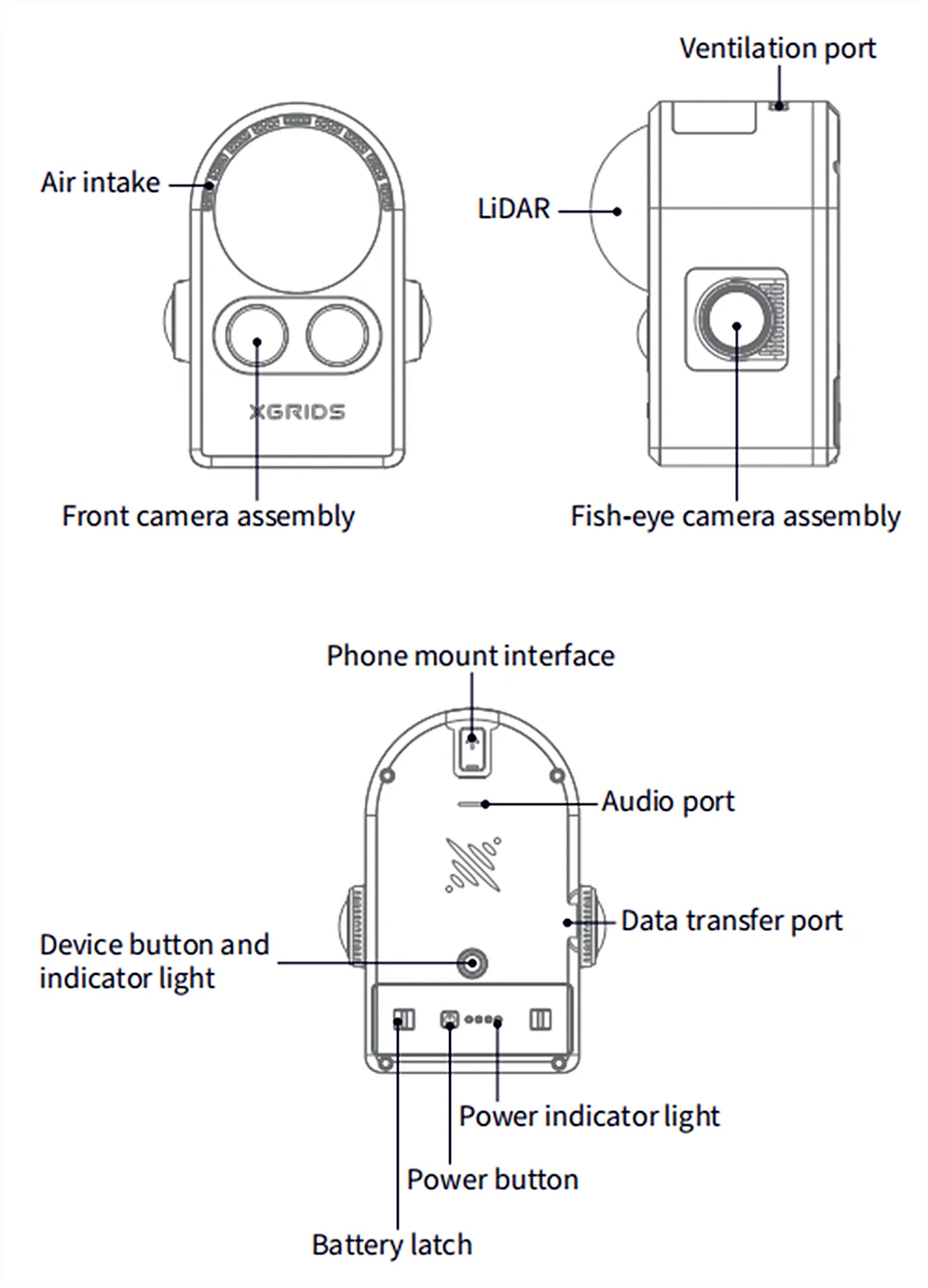
- When the device is powered on, it enters normal-power mode. If no scan is started within 5 minutes, the device switches to low-power mode. In low-power mode the power draw is about one third of normal-power mode; the LiDAR does not operate, but data can still be copied. After capture ends, the device also enters low-power mode once scanning is stopped and it has been idle for 5 minutes.
- The device gives audible alerts when powering on, powering off, and when the battery drops below 20% or below 10%. During recording, if the battery drops below 10%, the device force-stops recording and saves the data; when the battery drops below 5%, the device shuts down automatically to protect itself.
- If a battery below 10% is inserted into the device, the device will not power on.
- If the battery level shown in the app looks abnormal, the battery may not be fully seated. Press the buckles on both sides of the battery into place, then check the level again.
This chapter is from the official XGRIDS user manual. Official source (opens in a new tab) · Updated:



